TABLE OF CONTENTS
ADMIN PRIVILEGES REQUIRED
Overview
Site admins can control how questions and answers appear, how users write and edit posts, and how bounties work on Stack Internal Community. A bounty uses reputation to draw attention to a question and reward an answer.
To access these settings, click Admin settings in the left-hand menu, then Questions and answers. After changing the settings, click Save settings.
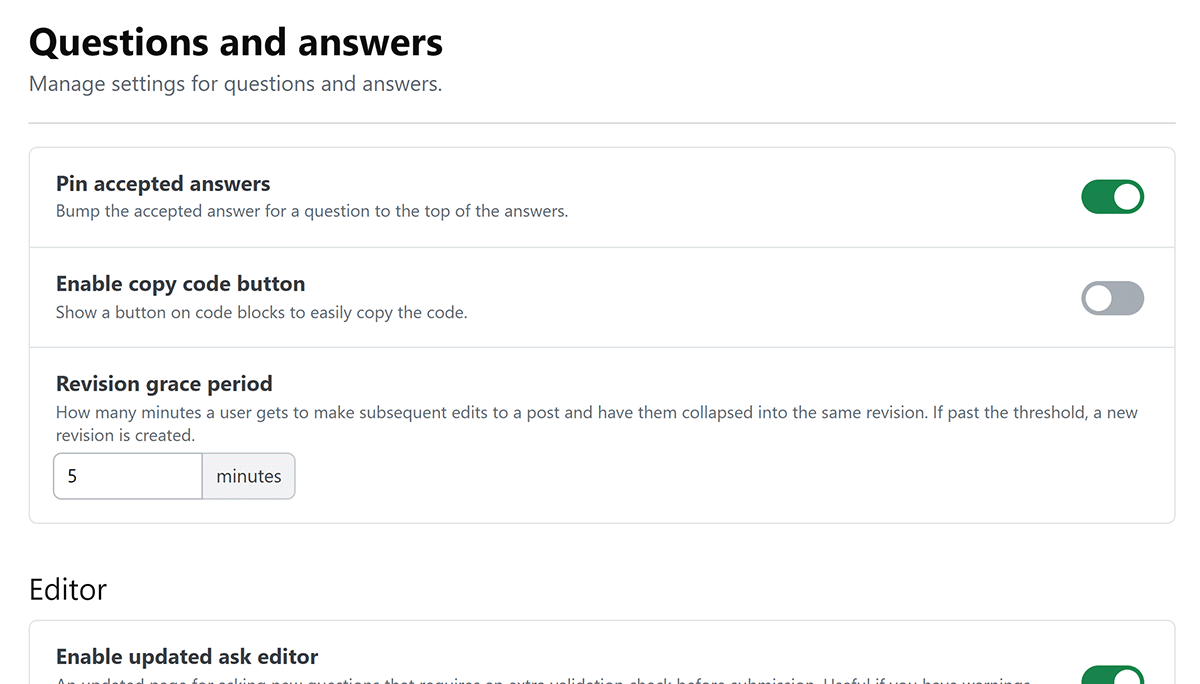
Question and answer display
These settings control accepted answers, code blocks, and edit history.
- Pin accepted answers Move the accepted answer to the top of the answers on its question.
- Enable copy code button Show a button that lets users copy the contents of a code block.
- Revision grace period Set the number of minutes during which a user's subsequent edits to a post are combined into the same revision. Later edits create a new revision. You can set this to between one and 60 minutes.
Editor
These settings affect the question editor and accessibility prompts.
- Enable updated ask editor Use an updated page for asking questions. It adds a validation check before submission, which can help when you've configured blocklist warnings.
- Live title length warning Show how many characters a user can add before a title reaches its maximum length.
- Title length warning threshold Set how many characters can remain before the warning appears. Set this to zero to always show the character count. This setting applies when Live title length warning is enabled.
- Warn about missing alt text Warn users when they insert an image without alternative text. Alternative text describes an image for people who can't see it.
Bounties
Use these settings to control when users can start and award bounties and how the site handles expired bounties.
- Minimum question age Set how long users must wait before starting a bounty on a question, from zero to seven days.
- Bounty duration Set how long a bounty runs, from five to 14 days.
- Minimum wait before awarding Set how long a user must wait after starting a bounty before awarding it, from zero to 1,440 minutes.
- Expiration grace period Set how long a user has to award an expired bounty manually before the system attempts to award it automatically, from one to 48 hours.
- Auto-award minimum score Set the minimum score an answer posted during the bounty period needs to be eligible for an automatic award, from zero to 10. If eligible answers have the same score, the earliest answer receives the award.
- Maximum bounties per user Set how many active bounties a user can have at once, from one to 10.
Bounty permissions
These options give moderators and admins additional bounty controls.
- Free bounties for moderators Allow moderators and admins to start bounties without spending their own reputation.
- Admins bypass restrictions Allow admins to start bounties without the minimum bounty progression and award them without the minimum wait.
- Admins can award any bounty Allow admins to award any active bounty on another user's behalf.
Get help
If you have questions or issues, reach out to our support team for help.