TABLE OF CONTENTS
ADMIN PRIVILEGES REQUIRED
Overview
Security settings help site admins manage session behavior, API access, and selected HTTP response headers for their Stack Internal Community site.
Access the security settings page by clicking Admin settings in the left-hand menu, then Security.
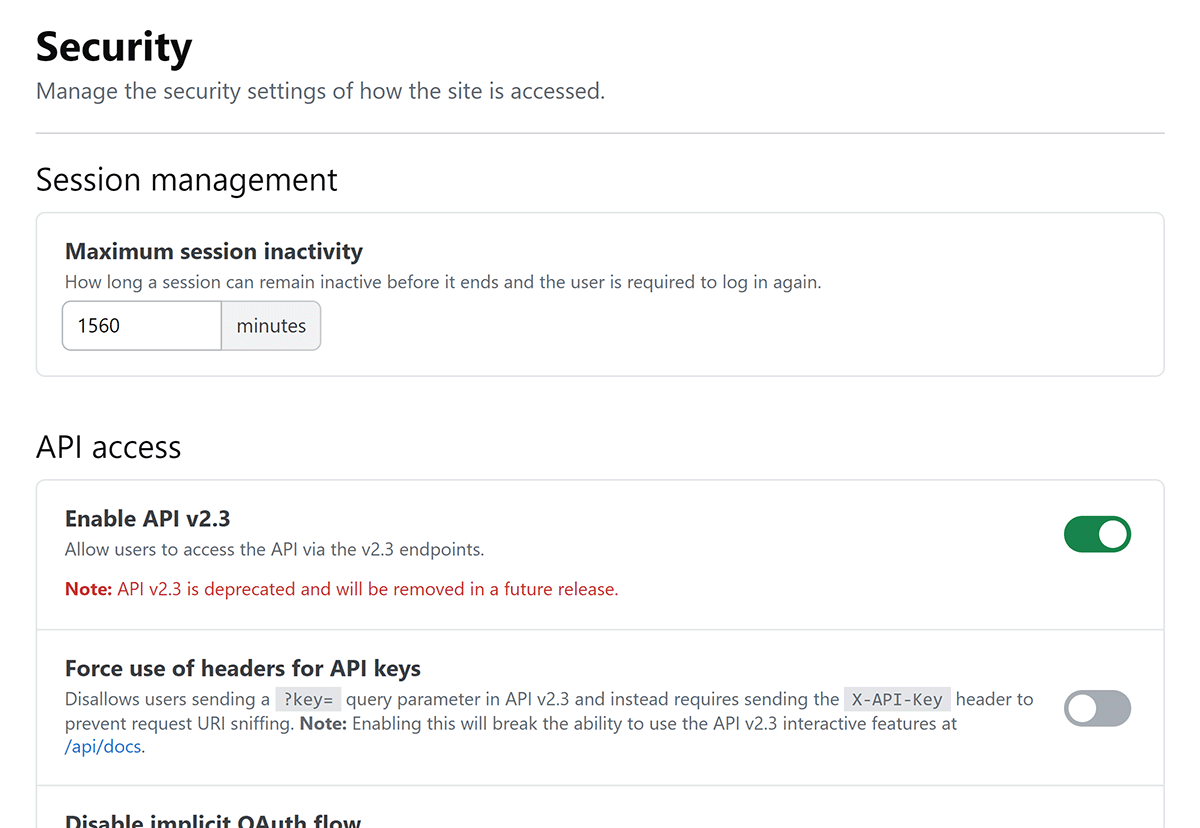
After changing the settings on this page, click Save settings to confirm and save the settings.
Make changes with care. Settings on this page can have wide-ranging effects on integrations, API access, regular browser sessions, and more.
Session management
Maximum session inactivity This controls how long, in minutes, an inactive user session can remain open before the user must sign in again. Lower settings increase security but can inconvenience users.
API access
Review existing API applications and integrations before changing API settings. Test changes in a non-production environment when possible.
Enable API v2.3 Toggle this to enable or disable user access to the older API v2.3. This API is deprecated, and will be removed in a future release.
Force use of headers for API keys Enable this to require API v2.3 clients to send their API key in the X-API-Key header. This setting blocks API keys sent with the key query parameter and helps protect keys from appearing in request URLs and logs. Enabling this setting disables the API v2.3 interactive documentation at https://[your_site].stackenterprise.co/api/docs.
Disable implicit OAuth Enable this to prevent the /oauth/dialog path from creating new API access tokens. That flow returns a token in a query parameter, which can expose it in request logs.
Limit API to admins Enable this to allow only admin API applications. Service applications remain available. The API applications page no longer appears in user settings while this setting is enabled. The setting does not delete existing API applications. If you disable this toggle, affected applications return to their earlier state.
Configure API v3 CORS access
CORS (cross-origin resource sharing) allows one site to read data from another site, an action that is usually blocked by browsers. Use these controls to allow specific web origins to call API v3 on your Stack Internal Community site. Add only origins that you own and trust. A permissive CORS policy can allow a malicious site to read API responses in a signed-in user's browser session.
- You can set the CORS controls only after you've disabled API v2.3 access.
- CORS controls do not replace API authentication or user permissions. An allowlisted origin can make browser requests to API v3, but each request still requires the appropriate credentials and is limited by the authenticated user's permissions.
- CORS does not affect server-to-server integrations, scripts, command-line tools, or API clients such as Postman.
Allow all CORS origins Enable this to allow API v3 calls from any web origin. Disable this to allow access to only listed origins (below).
Allowed CORS origins Enter an origin (URL) and click Add to add it to the allowlist. To remove an origin from the allowlist, click its X button.
Response headers
Cache control header Use this pull-down menu to override the default Cache-Control HTTP response header for your site. Options include private (default), private, no-cache, and private, no-store.
Cross origin opener policy header The cross origin opener policy (COOP) header controls whether a page can share its browser context with pages from other origins. A tighter COOP policy reduces the risk that another site can keep a reference to the page or interact with it through a browser. Options include unsafe-none (default, tightest), same-origin, and same-origin-allow-popups.
Send no-sniff header Enable to send a no-sniff header. This header forces browsers to honor the Content-type header sent by Stack Internal Community.
Get help
If you have questions or issues, reach out to our support team for help.