TABLE OF CONTENTS
ADMIN PRIVILEGES REQUIRED
Applies to:
Overview
Moderators perform a crucial role in keeping your site's content accurate and current. As a site admin, you can control many aspects of the moderator role.
Moderation controls
To manage your moderators, log in as a site admin and click Admin settings in the left-hand menu. Click Moderation under the "CONTENT" heading.
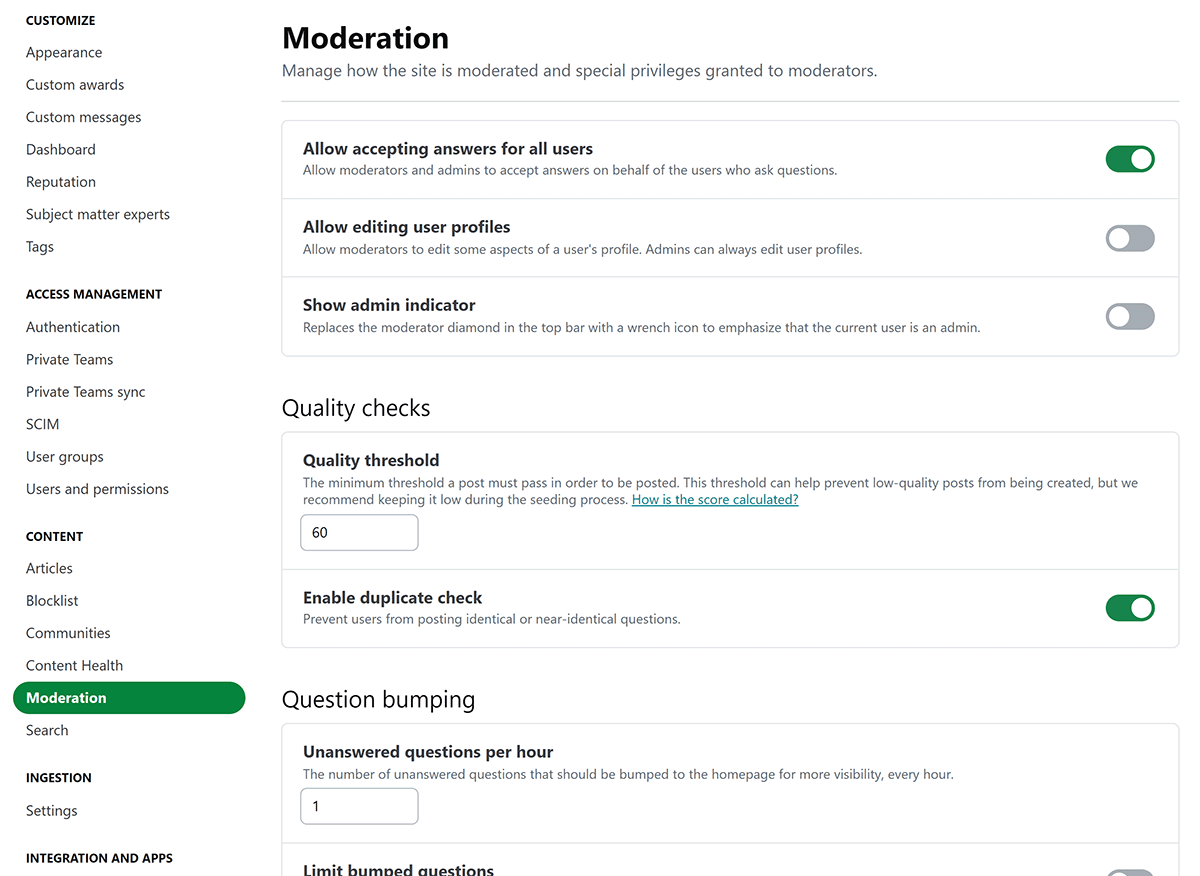
The Moderation page has the following controls.
- Allow accepting answers for all users Allow moderators and admins to accept answers on behalf of the users who ask questions.
- Allow editing user profiles Allow moderators to edit profile fields and some settings from the main Edit profile page. Admins can always edit user profiles.
- Show admin indicator Replace the moderator diamond in the top bar with a wrench icon to show that the current user is an admin.
Quality checks
- Quality threshold Set the minimum quality threshold a post must meet before users can publish it. This threshold can help prevent low-quality posts, but we recommend keeping it low during the seeding process.
- Enable duplicate check Prevent users from posting identical or near-identical questions.
Question bumping
- Unanswered questions per hour Set how many unanswered questions Stack Internal Community bumps to the homepage each hour.
- Limit bumped questions Limit how many bumped questions appear in the recently active list so they don't flood the homepage.
- Maximum bumped questions Set how many bumped questions can appear in the recently active list before Stack Internal Community stops bumping more questions.
Automated cleanup
- Abandoned closed questions Set how many days a closed question can go without edits before Stack Internal Community considers it abandoned and eligible for deletion.
- Abandoned questions Set how many days a question can go without answers before Stack Internal Community considers it abandoned and eligible for deletion.
- Dead questions Set how many days a negatively scored question can remain open before Stack Internal Community considers it dead and eligible for deletion.
Redaction
- Allow redactions Allow moderators to submit redactions on post revisions to remove sensitive information. Admins can always submit redactions.
- Allow revision comment edits Allow moderators to edit comments attached to revisions. Admins can always edit revision comments.
- Submit redactions as suggestions Send moderator-submitted redactions to the moderator queue for approval from another moderator or admin. Admins bypass this requirement. *
* Because private teams don't have a moderator queue, the redaction suggestion setting doesn't apply there. If admins allow moderators to submit redactions in private teams, those redactions won't require review.
https://doc-automation.netlify.app/pdfs/docs/community/enterprise/for_admins/moderation_settings.pdf