TABLE OF CONTENTS
Overview
Being able to effectively locate content in your knowledge base is an important skill. Sometimes, you need to go beyond basic searches to find what you need and filter out what you don't. Stack Internal Community offers many advanced search capabilities to make your searches precise and efficient.
To learn more about basic search functions, read the Basic Search article. To learn how to search your knowledge base and the public Stack Overflow site at the same time, read the Unified Search article.
Advanced search tips
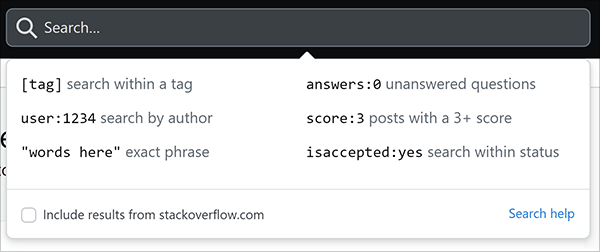
When you first place your cursor in the empty search box, you'll see helpful tips displayed under the search box.
The top of the search results page has an Advanced Search Tips link. Click it to see instructions for some of the most useful advanced search operators.
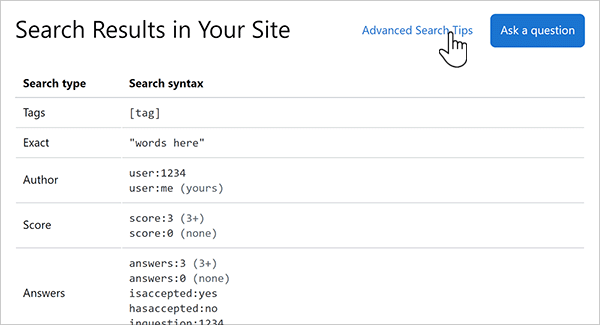
Click Advanced Search Tips again to hide the tips.
Advanced search operators
Stack Internal Community offers a number of advanced search operators to help you refine and focus your searches. You can combine multiple operators as needed.
Range operators
Range operators allow you to search for questions that fall within a particular range for score, number of answers, or number of views. You can enter an upper or lower parameter, or a range.
| Search Example | Results |
|---|---|
| score: or score:1.. | Return posts with a score greater than or equal to 1. |
| views:500..1000 | Return posts with 500 to 1,000 views. |
| answers:..3 | Return questions with 3 or fewer answers. |
Dates
You can use specific dates or date ranges to find posts created or active within a certain time period. You can use the following operators for date searches.
| Search Example | Results |
|---|---|
| created:(date or range) | Specify when the post was created. |
| lastactive:(date or range) | Specify when the post last had activity. |
Absolute dates and ranges
Stack Internal Community search supports the following date formats.
| Year only | Year and month | Full date | |
|---|---|---|---|
| Date | 2012 | 2012-04 | 2012-04-03 |
| Date Range | 2012..2013 | 2012-04..2012-05 | 2012-04-03..2012-04-04 |
The start of a date range is the first calendar day of the range, while the end is the last calendar day of the range. For example: if you specify a year, the search range will start on January 1 and end on December 31.
Relative dates and ranges
Relative dates are calculated relative to the current day. You can use shorthand terms "1y", "1m", and "1d" for "last year", "last month", and "yesterday" respectively. Use a number larger than 1 to search X years, months, or days ago. Use ".." to specify a start and end for a range.
Here are some examples of relative date and date range searches.
| Search Example | Results |
|---|---|
| created:1m | Posts created in the previous month |
| lastactive:7d | Posts last active seven days ago |
| created:3m… | Posts created in the last three months |
| lastactive:3m..2m | Posts last active between three and two months ago |
All times are in UTC (Coordinated Universal Time), so the results may not match your timezone.
User Operators
You can also limit searches to a specific user's content (your own or someone else's).
| Search Example | Results |
|---|---|
| user:123 | Returns posts created by the user with user ID 123. |
| inbookmarks:456 | Returns only questions that are in user 456's bookmarks. |
| intags:mine | Returns posts that appear in your watched tags. If you don't have any watched tags, this operator returns all posts. Note that you can't use the intags operator with a user ID. |
In advanced searches, "me" and "mine" are shorthand for your user ID. You can substitute these for the user ID in any user ID-based search.
Boolean Operators
Advanced search offers several boolean operators that generate identical results: 1/0, true/false, or yes/no. The following search operators use booleans.
| Search Example | Results |
|---|---|
| isaccepted:1/0 | Returns only accepted or unaccepted answers. |
| hascode:1/0 | Returns only posts that do/don't contain code blocks in the body. |
| hasaccepted:1/0 | Returns only questions that do/don't have accepted answers. |
| isanswered:1/0 | Returns only questions that do/don't have at least one positively-scored answer. |
| closed:1/0 | Returns only questions that are/aren't closed, including duplicates. |
| duplicate:1/0 | Returns only questions that are/aren't marked as a duplicate of another question. |
| obsolete:1/0 | Returns only posts that are/aren't marked as obsolete. |
The following boolean search operators are available only on Stack Internal Community Enterprise. Find your plan.
| Search Example | Results |
|---|---|
| migrated:1/0 | Returns only posts that have/haven't been migrated to a different site. |
| locked:1/0 | Returns only locked/unlocked posts (answers, edits, votes, and comments disabled) |
| hasnotice:1/0 | Returns only posts that do/don't have a notice appended. |
| wiki:1/0 | Returns only posts that are/aren't community wiki posts. |
OR operator
To combine results from multiple tags, separate the tag names (enclosed in square brackets) with the word "or". For example: the search "[apples] or [bananas]" returns questions tagged with either tag. Omitting "or" from the search implies the "and" operator, resulting in the search returning only those posts tagged with both tags.
Miscellaneous operators
| Search Example | Results |
|---|---|
| url:somewhere.com | Returns posts with a rendered hyperlink that contains the specified URL. |
| is:question | Returns only questions. |
| is:answer | Returns only answers. |
| inquestion:1234 | Returns only answers to the specified question. |
| inquestion:this | Returns only answers to the question you're currently viewing. |
Advanced search with the API
You can use the Stack Internal Community API /search endpoint with advanced search operators to search for content on your site. For more information on the API, check out our API v3 for Stack Internal Community Basic and Business and API v3 for Stack Internal Community Enterprise articles.