ADMIN PRIVILEGES REQUIRED
Applies to:
On the Users and permissions page found under Admin settings, site admins have a couple of options available to them for deleting a user. Click on the Actions drop-down for a specific user to access.
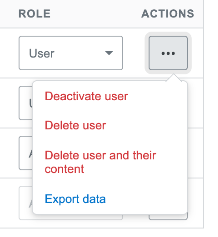
Delete User Deleting a user means that the user's account is deleted, and all of their content is now attributed to "User123" or a "Community" user instead.
Delete user and their content Deleting a user, and their content will remove the user, as well as all the questions, answers, comments, and articles created by the user.
Both of the options for deleting users are permanent and can't be undone. Once you confirm your selection, the user (and, optionally, their content) is gone.
https://doc-automation.netlify.app/pdfs/docs/community/free_basic_business/for_admins/manage_your_team/delete_a_user.pdf